QuasarAppUtils::OptionData Class Reference
The OptionData class contains information about one option. More...
#include <optiondata.h>
Collaboration diagram for QuasarAppUtils::OptionData:
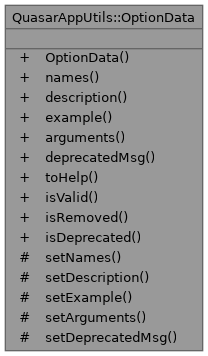
Public Member Functions | |
| OptionData (const QStringList &names, const QString &arguments="", const QString &description="", const QString &example="", const QString &deprecatedMsg="", bool removed=false) | |
| OptionData This is main constructor. | |
| const QStringList & | names () const |
| name This is name of the option. It is a required argument and cannot be empty. | |
| const QString & | description () const |
| description This is description message of this option. | |
| const QString & | example () const |
| example This is example of use string. | |
| const QString & | arguments () const |
| arguments This is input arguments of this option or help message about arguments. | |
| const QString & | deprecatedMsg () const |
| deprecatedWarning This is a message that will be printed as a warning if user will use this option. If you set this argument to empty value then warning message will be ignored and option not be marked asa a deprecated. An option will be marked as a deprecated when this arguments will not equal empty string. | |
| Help::Options | toHelp () const |
| toHelp This method convert this option into help line. The help line have next structure : | |
| bool | isValid () const |
| isValid This method return true if the option is valid. If option do not contain a name then it is invalid. | |
| bool | isRemoved () const |
| isRemoved This method return true if the option is removed. | |
| bool | isDeprecated () const |
| isDeprecated This method return true if this option is deprecated. | |
Protected Member Functions | |
| void | setNames (const QStringList &newNames) |
| setNames This method sets new value of the option name. | |
| void | setDescription (const QString &newDescription) |
| setDescription This method sets new description of this options. | |
| void | setExample (const QString &newExample) |
| setExample This method sets a new example value of this option | |
| void | setArguments (const QString &newArguments) |
| setArguments This method sets new value of the options arguments | |
| void | setDeprecatedMsg (const QString &newDeprecatedMsg) |
| setDeprecatedMsg This method sets new value of the deprecated warning message of this option. | |
Detailed Description
The OptionData class contains information about one option.
Definition at line 20 of file optiondata.h.
Constructor & Destructor Documentation
◆ OptionData()
| QuasarAppUtils::OptionData::OptionData | ( | const QStringList & | names, |
| const QString & | arguments = "", | ||
| const QString & | description = "", | ||
| const QString & | example = "", | ||
| const QString & | deprecatedMsg = "", | ||
| bool | removed = false ) |
OptionData This is main constructor.
- Parameters
-
names This is names list of the option. It is a required argument and cannot be empty. arguments This is input arguments of this option or help message about arguments. description This is description message of this option. example This is example of use string. deprecatedMsg This is a message that will be printed as a warning if user will use this option. If you set this argument to empty value then warning message will be ignored and option not be marked asa a deprecated. An option will be marked as a deprecated when this arguments will not equal empty string. removed This option show deprecatedMsg as a error and force the parseParams method return false. This option will be ignored if the deprecatedMsg will be empty.
Definition at line 13 of file optiondata.cpp.
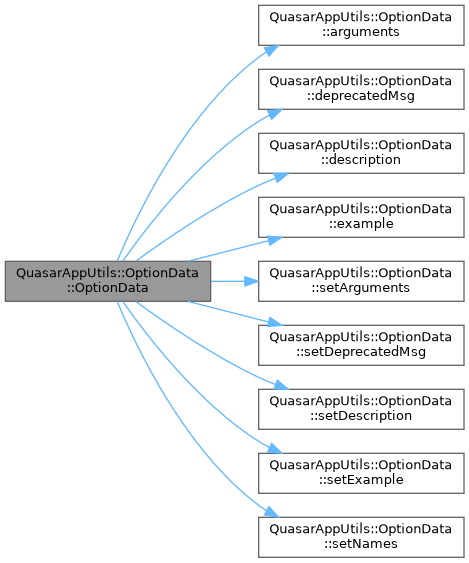
Here is the call graph for this function:
Member Function Documentation
◆ arguments()
| const QString & QuasarAppUtils::OptionData::arguments | ( | ) | const |
arguments This is input arguments of this option or help message about arguments.
- Returns
- return arguments of this option.
Definition at line 52 of file optiondata.cpp.
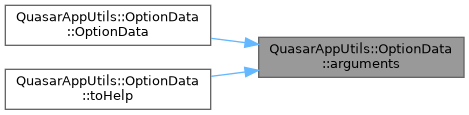
Here is the caller graph for this function:
◆ deprecatedMsg()
| const QString & QuasarAppUtils::OptionData::deprecatedMsg | ( | ) | const |
deprecatedWarning This is a message that will be printed as a warning if user will use this option. If you set this argument to empty value then warning message will be ignored and option not be marked asa a deprecated. An option will be marked as a deprecated when this arguments will not equal empty string.
- Note
- if this value is empty the option are not deprecated.
- Returns
- warning message of the deprecated options.
Definition at line 60 of file optiondata.cpp.
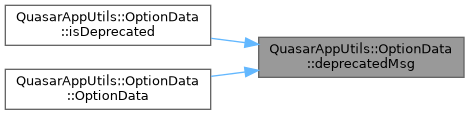
Here is the caller graph for this function:
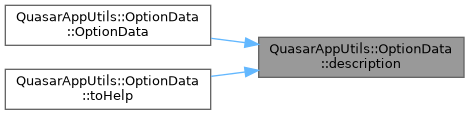
◆ description()
| const QString & QuasarAppUtils::OptionData::description | ( | ) | const |
description This is description message of this option.
- Returns
- return description of this option.
Definition at line 36 of file optiondata.cpp.
Here is the caller graph for this function:
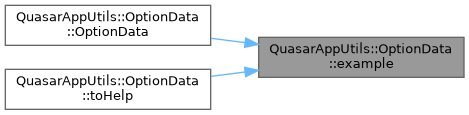
◆ example()
| const QString & QuasarAppUtils::OptionData::example | ( | ) | const |
example This is example of use string.
- Returns
- return example if use of this option.
Definition at line 44 of file optiondata.cpp.
Here is the caller graph for this function:
◆ isDeprecated()
| bool QuasarAppUtils::OptionData::isDeprecated | ( | ) | const |
isDeprecated This method return true if this option is deprecated.
- Returns
- true if options is deprecated else false
Definition at line 72 of file optiondata.cpp.
Here is the call graph for this function:

◆ isRemoved()
| bool QuasarAppUtils::OptionData::isRemoved | ( | ) | const |
isRemoved This method return true if the option is removed.
- Returns
- true if option is removed else false.
Definition at line 68 of file optiondata.cpp.
◆ isValid()
| bool QuasarAppUtils::OptionData::isValid | ( | ) | const |
isValid This method return true if the option is valid. If option do not contain a name then it is invalid.
- Returns
- true if the option valid else false.
Definition at line 87 of file optiondata.cpp.
Here is the call graph for this function:

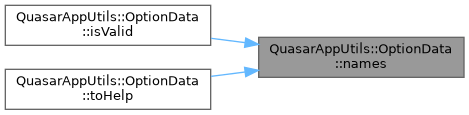
◆ names()
| const QStringList & QuasarAppUtils::OptionData::names | ( | ) | const |
name This is name of the option. It is a required argument and cannot be empty.
- Returns
- return name of this option.
Definition at line 28 of file optiondata.cpp.
Here is the caller graph for this function:
◆ setArguments()
|
protected |
setArguments This method sets new value of the options arguments
- Parameters
-
newArguments new value of the options arguments
- Note
- See the OptionData::arguments method.
Definition at line 56 of file optiondata.cpp.
Here is the caller graph for this function:

◆ setDeprecatedMsg()
|
protected |
setDeprecatedMsg This method sets new value of the deprecated warning message of this option.
- Parameters
-
newDeprecatedMsg This is new value of the deprecated message.
- Note
- See the OptionData::deprecatedMsg method.
Definition at line 64 of file optiondata.cpp.
Here is the caller graph for this function:

◆ setDescription()
|
protected |
setDescription This method sets new description of this options.
- Parameters
-
newDescription This is new value of options description
- Note
- See the OptionData::description method.
Definition at line 40 of file optiondata.cpp.
Here is the caller graph for this function:

◆ setExample()
|
protected |
setExample This method sets a new example value of this option
- Parameters
-
newExample This is a new value of the options example.
- Note
- See the OptionData::example method.
Definition at line 48 of file optiondata.cpp.
Here is the caller graph for this function:

◆ setNames()
|
protected |
setNames This method sets new value of the option name.
- Parameters
-
newNames This is a new value of the options name.
- Note
- see the OptionData::name method.
Definition at line 32 of file optiondata.cpp.
Here is the caller graph for this function:

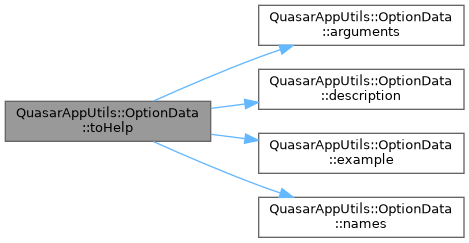
◆ toHelp()
| Help::Options QuasarAppUtils::OptionData::toHelp | ( | ) | const |
toHelp This method convert this option into help line. The help line have next structure :
Key: {name [arguments]} Value: {description examples}
- Returns
- The Help::Options set with one line.
Definition at line 76 of file optiondata.cpp.
Here is the call graph for this function:
The documentation for this class was generated from the following files: