QuasarAppUtils::Help Namespace Reference
Help namespace contains functions for printing help in to console. All Print functions automatically calc width of the console and aligns the text to fit the window. More...
Typedefs | |
| typedef QMultiMap< QString, QString > | Options |
| Options this is list of key-descriptions pairs of help. The key is name of the available argument and description is description of the available argument. | |
| typedef QMultiMap< QString, Options > | Section |
| Section This is list of the help Sections. The one section it is Title of the section and Help::Options list. | |
| typedef Section | Charters |
| Charters is wrapper of the Section type. | |
Functions | |
| void | print (const QString &key, const QString &value, int keyLength) |
| void | print (const Options &optionsList) |
| print This method print a one options list. | |
| void | print (const Section &help) |
| print This method print all sections of the help. | |
| void | setLineLength (int newLength) |
| setLineLength sets new length of the help line (width of the console window). If you set this into -1 then the window width will be selected automatically. | |
| int | width () |
| width This method return current width of the console window. | |
Detailed Description
Help namespace contains functions for printing help in to console. All Print functions automatically calc width of the console and aligns the text to fit the window.
Typedef Documentation
◆ Charters
◆ Options
| typedef QMultiMap<QString, QString> QuasarAppUtils::Help::Options |
Options this is list of key-descriptions pairs of help. The key is name of the available argument and description is description of the available argument.
Example:
{"argument2", "This is test argument2 of my application."}};
QMultiMap< QString, QString > Options
Options this is list of key-descriptions pairs of help. The key is name of the available argument and...
Definition helpdata.h:32
Definition at line 32 of file helpdata.h.
◆ Section
| typedef QMultiMap<QString, Options> QuasarAppUtils::Help::Section |
Section This is list of the help Sections. The one section it is Title of the section and Help::Options list.
Example:
{"argument2", "This is test argument2 of my application."}};
Section mySections = {{"This Is main section of the help", myOptionsList}};
QuasarAppUtils::Help::print(mySections);
void print(const QString &key, const QString &value, int keyLength)
Definition helpdata.cpp:37
QMultiMap< QString, Options > Section
Section This is list of the help Sections. The one section it is Title of the section and Help::Optio...
Definition helpdata.h:45
Definition at line 45 of file helpdata.h.
Function Documentation
◆ print() [1/3]
| void QUASARAPPSHARED_EXPORT QuasarAppUtils::Help::print | ( | const Options & | optionsList | ) |
print This method print a one options list.
- Parameters
-
optionsList This is options list.
Definition at line 61 of file helpdata.cpp.
Here is the call graph for this function:

◆ print() [2/3]
| void QuasarAppUtils::Help::print | ( | const QString & | key, |
| const QString & | value, | ||
| int | keyLength ) |
Definition at line 37 of file helpdata.cpp.
Here is the call graph for this function:
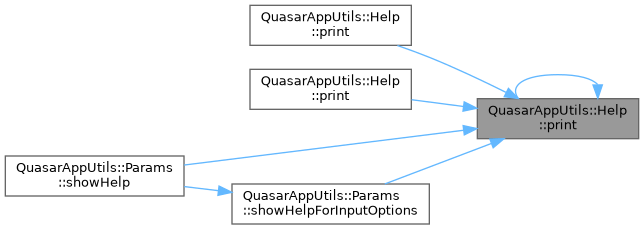
Here is the caller graph for this function:
◆ print() [3/3]
| void QUASARAPPSHARED_EXPORT QuasarAppUtils::Help::print | ( | const Section & | help | ) |
print This method print all sections of the help.
- Note
- This is main method for printing helps.
- Parameters
-
help This is sections list.
Definition at line 76 of file helpdata.cpp.
Here is the call graph for this function:

◆ setLineLength()
| void QUASARAPPSHARED_EXPORT QuasarAppUtils::Help::setLineLength | ( | int | newLength | ) |
setLineLength sets new length of the help line (width of the console window). If you set this into -1 then the window width will be selected automatically.
- Parameters
-
newLength This is a new size of the console window.
Definition at line 87 of file helpdata.cpp.
Here is the call graph for this function:
Here is the caller graph for this function:
◆ width()
| int QuasarAppUtils::Help::width | ( | ) |
width This method return current width of the console window.
- Returns
- width in pxels of the console window.
Definition at line 91 of file helpdata.cpp.
Here is the call graph for this function:
Here is the caller graph for this function: